
Who this is for: teachers
Available to: teachers on all subscriptions. Free subscriptions include a limited number of lessons.
Before you start: Nothing.
To view lessons, start in the Lesson Library
Tip: to see every lesson and its objective in one list, see Where can I see a list of all your lessons?
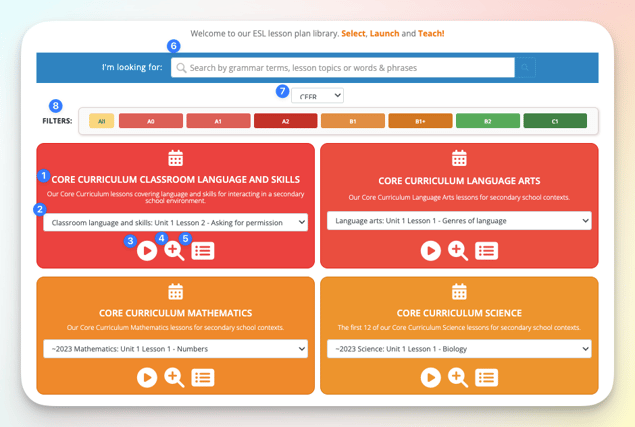
The Lesson Library gives you visibility into all of the lessons on your account.
- View the name of the curriculum or category of lessons
- Scroll through the list of the individual lessons in the section
- Launch lesson
- Preview lesson
- Preview homework
- Search
- Toggle Framework (WIDA, CEFR, TELPAS, CA ELD, ELPA21 and NY).
- Filter by proficiency level
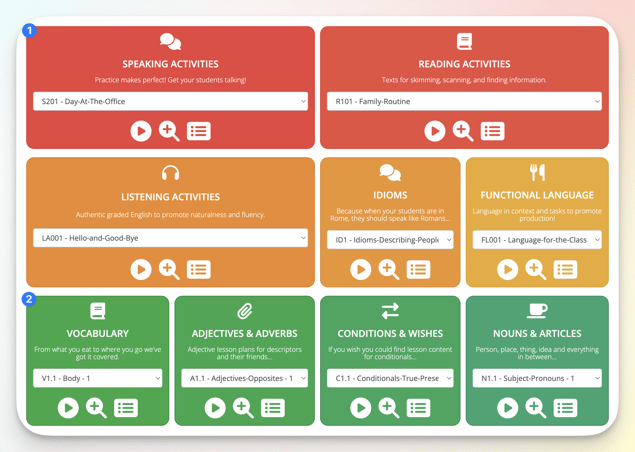
Scroll down the page to find more curriculum and lesson categories
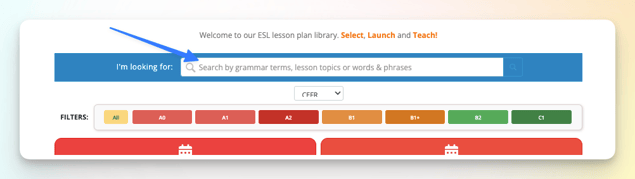
Use the search bar at the top to search for lessons
You can search for:
- The name of the curriculum or lesson category
- The name of the lesson
- The objective of the lesson
- The Can-do statement of the lesson
- The lesson skill (e.g. Speaking, Reading, etc.)
- The grammar topic (e.g. present simple, past continuous, linking words)
Teachers on the free plan can access all lessons that are not marked with a “+”. Download the list of available lessons here.
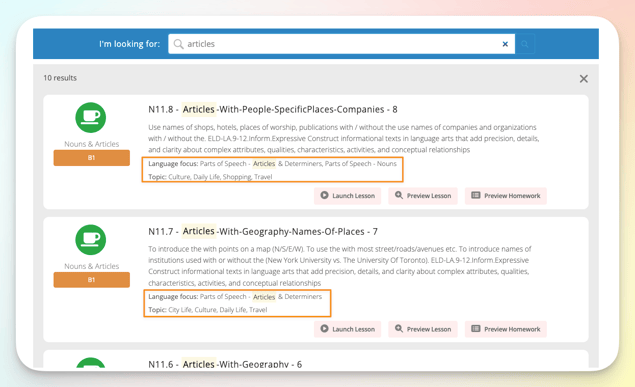
Each result shows the lesson's Language focus and Topic
Language focus: the grammar or language point the lesson teaches
Topic: the subject matter it uses to teach that point
To see how to teach a lesson, not just find it, open its Teacher Guide or Teacher Notes. See Teacher Guides.
Related articles
- Launch a lesson
- Classroom
- How can I use proficiency level filters in the lesson library?
- Where can I see a list of all your lessons?