
Available to all Teachers on paid and free subscriptions. However, classes are limited to paid subscriptions.
For a brief video overview of student management, click here.
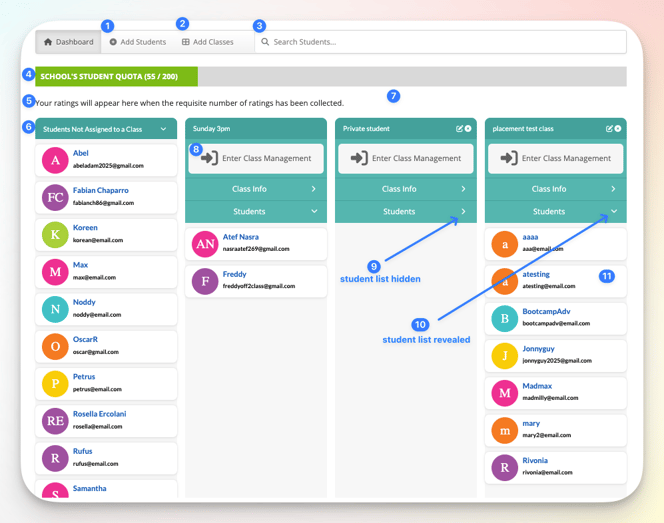
- Add Students: Create new student accounts.
- Add Classes: Create a new class.
- Search students: Enter the student's name or email to locate them easily.
- Your quota: Shows the number of students you currently have as well as the total number permitted.
- Your ratings: Shows students' ratings, out of 5 stars (if enabled).
- Students not Assigned to a Class: Individual students, not yet assigned to classes.
- Classes: All your classes are shown here.
- Class Management: Click to access special features to assist with class management.
- Students hidden: Click the arrow to hide the list of students in the class.
- Students showing: Click the arrow to reveal the list of students in the class.
- Student name & email: Click on the card to open the student's page