
Who this is for: teachers
Available to: teachers on all subscriptions
Watch a short video overview of Independent Practice (Homework) and Unit Checks.
Independent Practice helps students consolidate their learning between classes. It gives teachers insights into how well students have understood each lesson, so they can adjust instruction and provide targeted support as needed.
Together with Unit Checks, Independent Practice allows teachers to monitor student progress and build proficiency step by step. While Unit Checks are only available for sequential curriculums that are divided into units, Independent Practice is available for every lesson in the Off2Class library. This ensures that students have regular opportunities to practice and review, no matter what lesson series or curriculum they are working through.
Many Off2Class Independent Practice assignments also support student audio recordings, allowing learners to practice speaking outside of class. These recordings give teachers insight into pronunciation, fluency, and confidence, making it easier to provide targeted feedback and track speaking progress over time.
Students who need reading support can have Independent Practice read aloud with the text-to-speech tools on their device, such as Select-to-speak on Chromebooks, Read aloud in Microsoft Edge and Speak Selection on iPad and Mac. Independent Practice also works with screen readers. There isn't a read-aloud button inside Off2Class Independent Practice. In lessons, students can highlight a word or sentence and right-click to open the Scaffolding Menu, then select Audio to hear it read aloud. See How can I help my student use the interactive tools?
Offline practice
Looking for printable materials that students can complete away from the screen? Student Handouts provide structured practice, review activities, and additional writing exercises that can be printed or shared digitally. They are designed to reinforce lesson content and support independent learning outside of class.
Preview Independent Practice
- Open the Lesson Library.
- Find the lesson you want and select it.
- At the bottom of the lesson card, next to the launch lesson button, select the white list icon.
Result: the Independent Practice preview opens.

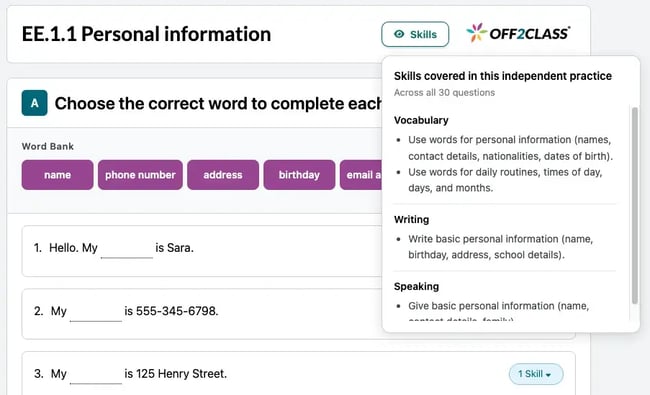
The preview also shows which skills the Independent Practice covers. Select Skills next to the lesson title to see every skill it covers, grouped by domain. Each question has its own skill tag, for example 1 Skill.
The answer key is only available after the student starts the Independent Practice. Before that, you can preview the questions, but you won't see the correct answers yet.
Note: The preview shows matching items and word bank options in their original order. When students complete the Independent Practice, these are shuffled, so the order they see won't match the preview.
Note: As of November 5, 2026 we've renamed Homework to Independent Practice.