
Who this is for: teachers
Available to: teachers in the Games private beta
Before you start: Nothing.
Contents
- What it is
- What sets it apart
- What's on the screen
- How it works with your lessons and Independent Practice
- Where to find it
- Things to know
What it is
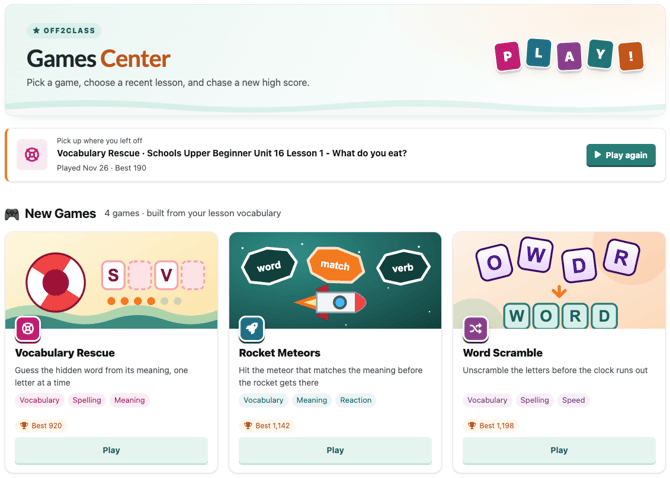
The Games Center is where you find the Off2Class games. It has four new games built from the vocabulary of a lesson, and the two classic games, Quiz and Game Show.
Each new game uses the words and meanings from one lesson you choose. You can play on the board with your class, and students can play the same games in their own accounts.
What sets it apart
Built from the lessons you teach
Every Off2Class lesson introduces new vocabulary. Each new game takes the words and meanings from the lesson you pick, so students practice the words they've just met. Your 12 most recent lessons are ready to play, but you can also search for any other lesson.
Use a game as a warm-up or to close a lesson. Share your screen, play the game from the lesson you just taught and let the class call out the answers.
Every game ends with the words to review
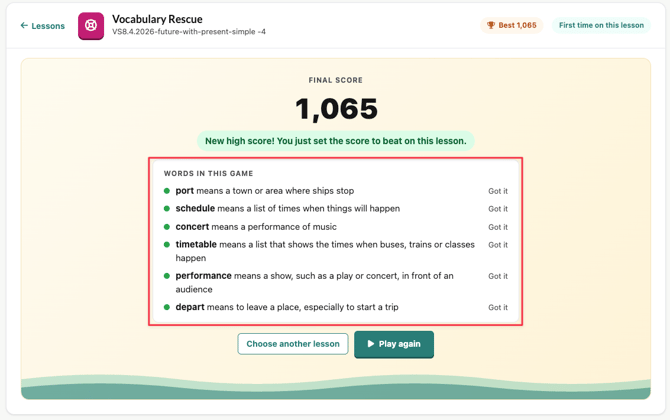
When a game ends, you see the final score and Words in this game: every word with its meaning, marked Got it, Skipped or Missed. Go over the skipped and missed words with the class before you move on.
What's on the screen
| Area | What it does |
|---|---|
| Pick up where you left off | Your last game and lesson. Select Play again to start it again. |
| New Games | The four games built from your lesson vocabulary. Each card shows your best score. |
| Vocabulary Rescue | Read the meaning and pick letters to find the hidden word. Six words, with six lives for each word. |
| Rocket Meteors | Hit the meteor with the word that matches the meaning before the rocket reaches it. 12 rounds of 15 seconds. |
| Word Scramble | Unscramble 10 words, each with its own clock. Letters in the right place turn green and stay. |
| Memory Match | Match eight meanings to their words. Each card is read aloud when it flips. |
| Classic Games | Quiz and Game Show, with fixed question sets you play with the whole class on a shared screen. See How can I use games in the classroom? |
The full rules for each new game are in Play a vocabulary game.
How it works with your lessons and Independent Practice
- Lessons: the new games use the vocabulary of the lesson you pick. The list shows your 12 most recent lessons, and Search all lessons finds any other lesson, so you don't have to teach a lesson before you play its games.
- Your recent lessons: the lesson list in each game shows the 12 most recent lessons you've been part of. Students see the lessons they've been part of.
- Independent Practice: games sit alongside Independent Practice (Homework) rather than replacing it. You assign and review Independent Practice. Games aren't assigned, and students choose a game and a lesson themselves.
- Classic Games: Quiz and Game Show use their own question sets and aren't linked to a lesson.
Where to find it
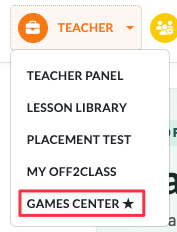
- In the Teacher menu, select Games Center.
Result: the Games Center opens, with New Games and Classic Games.
Tip: you can also go straight to app.off2class.com/games.
Things to know
- Games is in private beta. Teachers who haven't joined don't see it yet, and the classic games stay where they are.
- A game shows Not available for this lesson when the lesson doesn't have enough vocabulary for that game. The same lesson can be playable in one game and not in another.
- Until you've been part of a lesson, your recent lessons list is empty. Use Search all lessons to pick any lesson.
- Your best score is saved for each game and each lesson.
- In every game, students can skip a word they can't solve. A skipped word earns no points.