
Who this is for: managers
Available to: managers on paid multi-teacher subscriptions
Two error messages might appear when you add a teacher. Each one is covered below, with how to solve it.
- Transfer: A user with the email address is already registered on this site
- Reactivate: A teacher with the email address existed and was deleted
How to transfer a teacher
Error message: A user with the email address is already registered on this site
After you try to add the teacher, select Click here
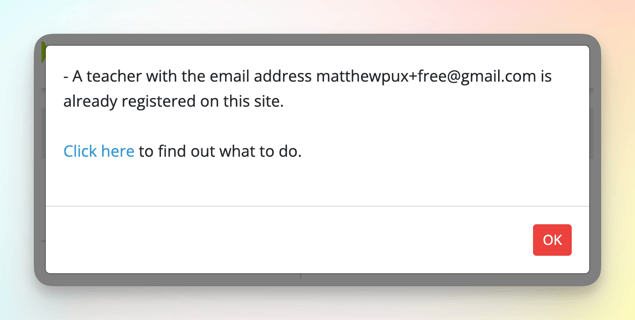
Select Request Transfer from teacher

Ask the teacher to find the email and select Accept request at the bottom
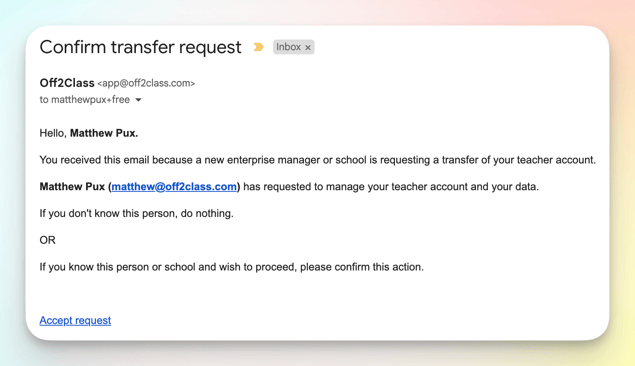
The email comes from app@off2class.com with the subject Confirm transfer request. The link lasts for 168 hours. Once the teacher selects it, they're added to your account.
If the teacher sees "Error: You are the main owner of an active subscription. Your account cannot be transferred until the subscription is ended or transferred to another owner. Please contact Customer Support.", they own their own Off2Class subscription. Contact Support with the teacher's email address and we'll help.
How to reactivate a teacher
Error message: A teacher with the email address existed and was deleted
After you try to add the teacher, select Click here

Select Request reactivation from teacher

Ask the teacher to find the email and select Reactivate my account at the bottom

The email comes from app@off2class.com with the subject Confirm Reactivation. The link lasts for 24 hours. Once the teacher selects it, they're added to your account.