
The features mentioned in this article are available to account/subscription owners.
Related articles:
Click Account in the drop-down menu under your name in the top right
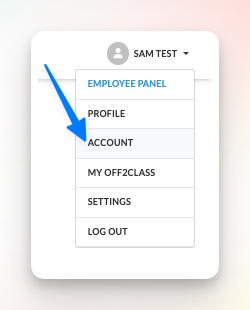
View your subscription details after completing a successful payment transaction

- Your current subscription: Subscription plan details, including Premium or Standard, yearly or monthly, and the number of students.
- Renewing on: Date of renewal, along with the cost.
Note: Current receipts and tax invoices can also be downloaded directly from your billing history.
If you don’t see your subscription details on the Account page yet, wait until after your renewal date. Once your current subscription expires, you’ll be able to return to the Account page and click Subscribe now to view the available subscription options.