
Who this is for: teachers
Available to: teachers on all subscriptions. Free subscriptions include the Grammar section only.
Before you start: a student account for each student you want to test.
As of May 19, 2026, the Adaptive Placement Test is available to all users.
Contents
What's new?
- It's shorter: The test now adapts to each student. Question difficulty adjusts based on their answers, so the test can assess their proficiency level in far fewer questions.
- It can assess specific domains: You can choose exactly which domains to test. For example, if you only want to assess reading, you can assign just a reading test instead of requiring grammar first.
- It works for all levels in the beginner to advanced range: Because the test adapts, it’s now suitable for more students. Lower-level students won’t have to work through 100+ questions, many of which may be too difficult; higher-level students won’t have to answer questions that are too simple before getting to ones that are more suitable.
How can I assign the Adaptive Placement Test?
- Hover over the teacher menu in the top left
- Select 'placement test'
- Select 'adaptive placement test'
Configure the test
- Select each domain you want to test. Nothing is selected to begin with, so select Grammar too if you want to test it.
Assign the test
- Select Assign Test.
- In Who is doing the Placement Test?, select Students or Classes. You can send the test to a whole class.
- From the dropdown, select the student or class.
- Select Send Test.
Result: the test appears on the student's To Do tab, under Placement Tests.
You’ll be notified by email when a student completes their test, but results are always available on their profile page for immediate review. Learn more about what students see when assigned a placement test here.
How can I review my students' placement test results?
If your student is assigned to a class, you can view their test in Class Management. Otherwise, you can review it on their Student Profile.
When viewing an assigned placement test, there are three different statuses:
- Not started yet (Assigned, not started): You have assigned the test, but the student has not opened it yet.
- Ongoing (Started, not submitted): The student has opened the test but has not answered all of the questions yet.
- Not reviewed: The test is completed and is ready for you to review.
Reviewing the results from the Student Profile
- From Student Management, click on the student.
- Click on 'show results' in the orange row on the student's profile
- This action will open a new tab with the results (click here to learn about the results tab)
- This action will open a new tab with the results (click here to learn about the results tab)
Reviewing the results from Class Management
- From Student Management, locate the class and click 'enter class management'
- Navigate to the 'adaptive placement test' column and the row with your student's name
- Click 'not reviewed', then click 'review'
- This action will open a new tab with the results
- This action will open a new tab with the results
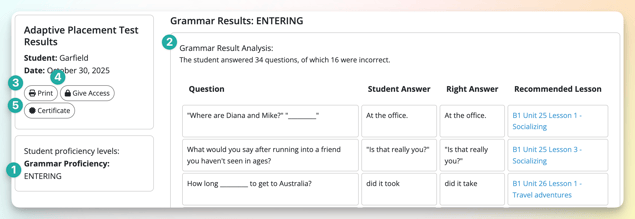
From the results tab, you can:
- Review the proficiency level: Review the student’s level to help determine which lessons to teach next. We recommend using our Step-by-Step Curriculum after the test.
- Review the results: Review all of the questions your student got correct and incorrect. We include the question, your student’s answer, and the correct answer. The results analysis shows you the specific lessons we recommend to correct the errors.
- Print: Print the results and share them with your student (or their parents/guardians).
- Give Access: Give your student access to the results so they can review them in Off2Class.
- Create a certificate: Create a certificate for your student to document their current learning level.
Adjusting a proficiency level
If your professional judgment differs from the test result, you can change the level the Adaptive Placement Test assigned. Each domain is adjusted separately, so you can change the Grammar level without affecting Speaking.
- Open the test results.
- In the left-hand column under Student proficiency levels, find the domain you want to change.
- Click the pen icon next to the level.
- Select the new level from the drop-down, then click Save.
How can my student take the test?

After you assign the test, it becomes immediately available to your student. Your student will follow these steps:
- Log in via our login page (or via Clever/Classlink if rostered via SSO)
- On the To Do tab, scroll down to 'placement tests'
- Click on 'adaptive placement test'
- Review the assigned sections (e.g. grammar, reading) and estimated time to complete, then click 'continue'
- Review the instructions and click 'start test' on the right once ready to begin
- Answer all of the questions.
- The test will end once there is enough information to accurately predict a proficiency level
The results are private until reviewed and shared by the assigned teacher.
FAQ
How can I get access to the Adaptive Placement Test [Beta] to be one of the first people to beta-test the additional domains?
All sections are now available on all paid subscriptions.
You mention that sections can be reassigned to target domains. How does this work?
When assigning the Adaptive Placement Test, you can choose exactly what sections to assign. For example, you can test only reading or a combination of grammar and additional domains.
Can I assign the Adaptive Placement test to my absolute beginner/newcomer students?
The Adaptive Placement Test currently only contains questions in the beginner (CEFR A1, WIDA 1.0 Entering) to advanced (CEFR C1, WIDA 5.0 Bridging/Reaching) range. An expansion to the Adaptive Placement Test is planned for 2026 that will cover content at the absolute beginner (CEFR A0, WIDA <1.0 Pre-Entering) level.
Can I assign the Adaptive Placement Test to the same student more than once? For example, to monitor progress?
Absolutely! Assign it at the start and end of the school year (or as often as you want) to monitor progress from level to level.
Access to all previous tests is always available, allowing you to continue assigning the test and reviewing all of the results. The test draws from a pool of over 1,000 questions, so if you assign the test to the same students again, they won't always be asked the same questions repeatedly.
The version of the Adaptive Placement Test we’re releasing today is only the start; we’re adding additional features over the next several months that will make progress monitoring even more powerful.
Will I lose access to the Standard Placement Test?
No. You can toggle between them as needed.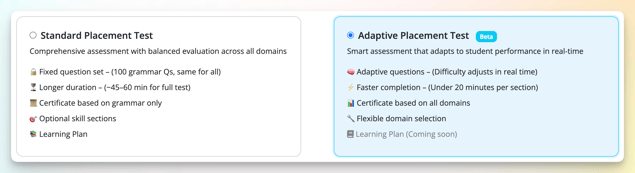
How does the Adaptive Placement Test grade writing and speaking responses?
The Writing section of the Adaptive Placement Test is scored using AI technology designed to evaluate written communication in a consistent and objective way. The rubric below is intended to demonstrate the key features and performance areas that contribute to scoring, including organization, mechanics, and lexical range.
| Proficiency Level | Organization | Mechanics | Lexical Range |
|---|---|---|---|
| Absolute Beginner | Student communicates isolated words, copied phrases, or very short responses related to familiar topics. Writing may not yet form complete sentences, and ideas may appear disconnected or heavily dependent on models or prompts. | Student demonstrates emerging control of basic English writing conventions. Writing contains frequent grammatical, spelling, and punctuation errors that may make meaning difficult to understand, although familiar words or patterns are sometimes recognizable. | Student uses a very limited range of everyday vocabulary related to personal information, classroom topics, or immediate needs. Word choice is often repetitive and may rely on memorized language or first-language influence. |
| Beginner | Student writes short simple sentences about familiar topics and can communicate basic ideas in a predictable order. Responses may feel repetitive or minimally developed, with limited use of connectors or supporting details. | Student uses simple sentence structures and familiar grammatical patterns with emerging control. Frequent errors with word order, verb forms, articles, spelling, and punctuation are common, but meaning is generally understandable. | Student uses basic everyday vocabulary to express simple ideas and personal experiences. Vocabulary is limited and repetitive, though the student can communicate familiar information using common words and expressions. |
| Upper Beginner | Student writes connected simple sentences that begin to include reasons, descriptions, or supporting details. Ideas are generally organized in a logical order, though transitions may be limited or repetitive. | Student demonstrates developing control of simple grammar structures and attempts longer or more varied sentences. Errors with verb tense, prepositions, agreement, spelling, and punctuation are still noticeable but usually do not prevent understanding. | Student uses an expanding range of familiar vocabulary to describe experiences, preferences, and opinions. Word choice shows some variety, although vocabulary remains somewhat general and errors in word form or usage may occur. |
| Pre-Intermediate | Student organizes ideas into a clear paragraph or extended response with an identifiable beginning, middle, and ending. Writing includes supporting details and simple transitions to connect ideas, although development may sometimes be uneven. | Student uses a variety of simple and some more complex sentence structures with growing consistency. Grammatical errors are still evident, particularly in more complex forms, but the overall message remains clear and coherent. Spelling and punctuation are generally appropriate for familiar vocabulary and structures. | Student uses a functional range of vocabulary to explain ideas, give reasons, and describe situations in some detail. Vocabulary is generally appropriate to the topic, though word choice may still be somewhat imprecise or repetitive at times. |
| Intermediate | Student develops ideas with relevant details and organizes writing in a logical and cohesive way. Transitions and supporting information help connect sentences and paragraphs, although some parts may still lack depth or precision. | Student demonstrates increased control of grammatical structures, including compound and some complex sentences. Errors may still appear with agreement, tense consistency, or more advanced structures, but they rarely interfere with meaning. Spelling and punctuation are usually accurate. | Student uses a broader range of vocabulary to elaborate, explain, and compare ideas. Word choice is more precise and flexible, though occasional awkward phrasing or misuse of less familiar vocabulary may still occur. |
| Upper Intermediate | Student writes well-organized and sustained responses with clear progression of ideas and effective use of transitions. Writing demonstrates the ability to narrate, explain, contrast, and/or support opinions with multiple relevant details and examples. | Student uses a variety of sentence structures with generally strong grammatical control. Occasional errors may appear in more sophisticated language, but they do not distract from communication. Spelling and punctuation are consistently appropriate and support readability. | Student uses a varied and effective range of vocabulary to narrate experiences, express opinions, explain relationships between ideas, and discuss less familiar topics. Vocabulary is generally accurate and appropriate, though some language may remain somewhat broad or lack nuance. |
| Advanced | Student produces cohesive, well-developed writing that communicates complex ideas clearly and effectively. Organization is purposeful and fluid, with effective transitions, nuanced support, and clear relationships between ideas throughout the response. | Student demonstrates strong control of a wide variety of grammatical structures and sentence patterns. Minor errors may still occur in complex language use, but writing remains polished, clear, and easy to follow. Spelling and punctuation are consistently accurate and enhance clarity. | Student uses a wide and flexible range of vocabulary with increasing precision and sophistication. Word choice supports nuanced meaning, detailed explanation, and stylistic variation, with only occasional minor inaccuracies in less common language. |
The Speaking section of the Adaptive Placement Test is scored using AI technology designed to evaluate spoken communication in a consistent and objective way. The rubric below is intended to demonstrate the key features and performance areas that contribute to scoring, including clarity, grammatical and lexical range, and fluency.
| Proficiency Level | Clarity | Grammatical and Lexical Range | Fluency |
|---|---|---|---|
| Absolute Beginner | Student communicates using isolated words, memorized expressions, or very short responses related to familiar topics. Meaning may be difficult to understand without repetition, gestures, or support from the listener. | Student demonstrates emerging use of basic vocabulary and simple language patterns, often without sentence structure. Errors are frequent and may significantly limit communication, though familiar words or phrases may still convey basic meaning. | Student speaks in very short chunks with frequent pauses, repetition, or hesitation. Speech may rely heavily on prompting or modeling and is often limited to single words or memorized phrases. |
| Beginner | Student communicates simple ideas about familiar topics using short sentences or predictable expressions. Meaning is generally understandable, although ideas may be loosely connected and lack detail or expansion. | Student begins producing subject-verb constructions with some reliability, using simple vocabulary and familiar grammatical structures to express basic information. Frequent errors with verb forms, sentence structure, and word choice are common, but the listener can usually understand the intended message. | Student speaks in short, simple sentences with noticeable pauses and repetition. Speech may sound slow or effortful at times, especially when the student searches for vocabulary or attempts longer responses. |
| Upper Beginner | Student communicates ideas more clearly by adding simple descriptions, reasons, or details. Responses are generally organized and understandable, although connections between ideas may still be basic or uneven. | Student begins using simple verb tenses consistently and forming basic questions. Student uses an expanding range of everyday vocabulary and attempts longer or more varied sentence structures. Errors with grammar and word usage are still noticeable, but they usually do not prevent communication. | Student can sustain a short response with some continuity and less reliance on pauses or repetition. Hesitation may still occur during longer responses or when expressing less familiar ideas, but communication generally continues successfully. |
| Pre-Intermediate | Student communicates complete ideas with relevant details and supporting information. Responses are generally clear and organized, though explanations may remain fairly direct or predictable. | Student uses a variety of simple and some more complex grammatical structures to explain, describe, and give reasons. Student may begin connecting clauses with basic conjunctions (because, but, so). Vocabulary is adequate for familiar and some less familiar topics, although language may still be repetitive or somewhat imprecise. Errors are evident but usually do not interfere with understanding. | Student speaks with growing confidence and can maintain connected speech for an extended response. Pauses and self-corrections still occur, particularly when organizing ideas or attempting more complex language, but overall communication remains smooth. |
| Intermediate | Student communicates ideas clearly and develops responses with explanation, comparison, or reasoning. Ideas are connected logically, and the student can adapt language to support different purposes or situations. | Student demonstrates increased control of grammatical structures and uses a broader range of vocabulary to elaborate and clarify meaning. Student may use subordinate clauses and a range of tenses with general accuracy. Language is generally accurate and flexible, though occasional awkward phrasing or grammatical inconsistencies may still appear. | Student speaks at a generally natural pace and can sustain longer responses with limited interruption. Hesitation is usually connected to planning more detailed or complex ideas rather than difficulty producing language. |
| Upper Intermediate | Student communicates clearly and effectively across a range of familiar and abstract topics. Responses are well organized and include explanation, contrast, and support for opinions, although some ideas may still lack nuance or precision. | Student uses a wide range of grammatical structures and vocabulary to express detailed ideas, speculate, and justify opinions. Student begins controlling complex structures (conditionals, reported speech, passive) with some consistency. Errors may still occur in more sophisticated language use, but they rarely interfere with clarity or overall effectiveness. | Student speaks smoothly and can sustain extended responses with relatively consistent pacing and organization. Occasional hesitation or reformulation may occur when discussing complex ideas, but it does not significantly disrupt communication. |
| Advanced | Student communicates complex and nuanced ideas clearly, effectively, and with strong organization. Responses demonstrate flexibility in explaining, analyzing, and supporting ideas for different purposes or audiences. | Student demonstrates strong control of a broad and flexible range of grammatical structures and vocabulary. Language use is precise and sophisticated, allowing the student to express subtle distinctions and complex reasoning, even though minor errors may occasionally occur. | Student speaks fluently and confidently with natural pacing and strong continuity of ideas. Speech flows smoothly even during complex explanations or abstract discussion, with only occasional hesitation for refinement or emphasis. |
Has the certificate been redesigned?
Yes: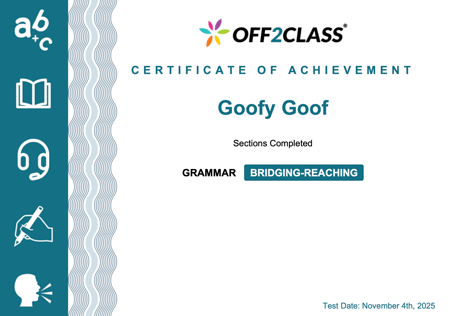
Certificates can only be accessed from the Placement Test results page.
How can I report feedback and bugs?
Contact Matthew: matthew@off2class.com. We're eager to hear your feedback, so please share it, big or small! After you have used the Adaptive Placement Test, you can complete this survey or book a feedback meeting with Matthew here. Your feedback will help prioritize updates and enhancements to the test.