
What changed
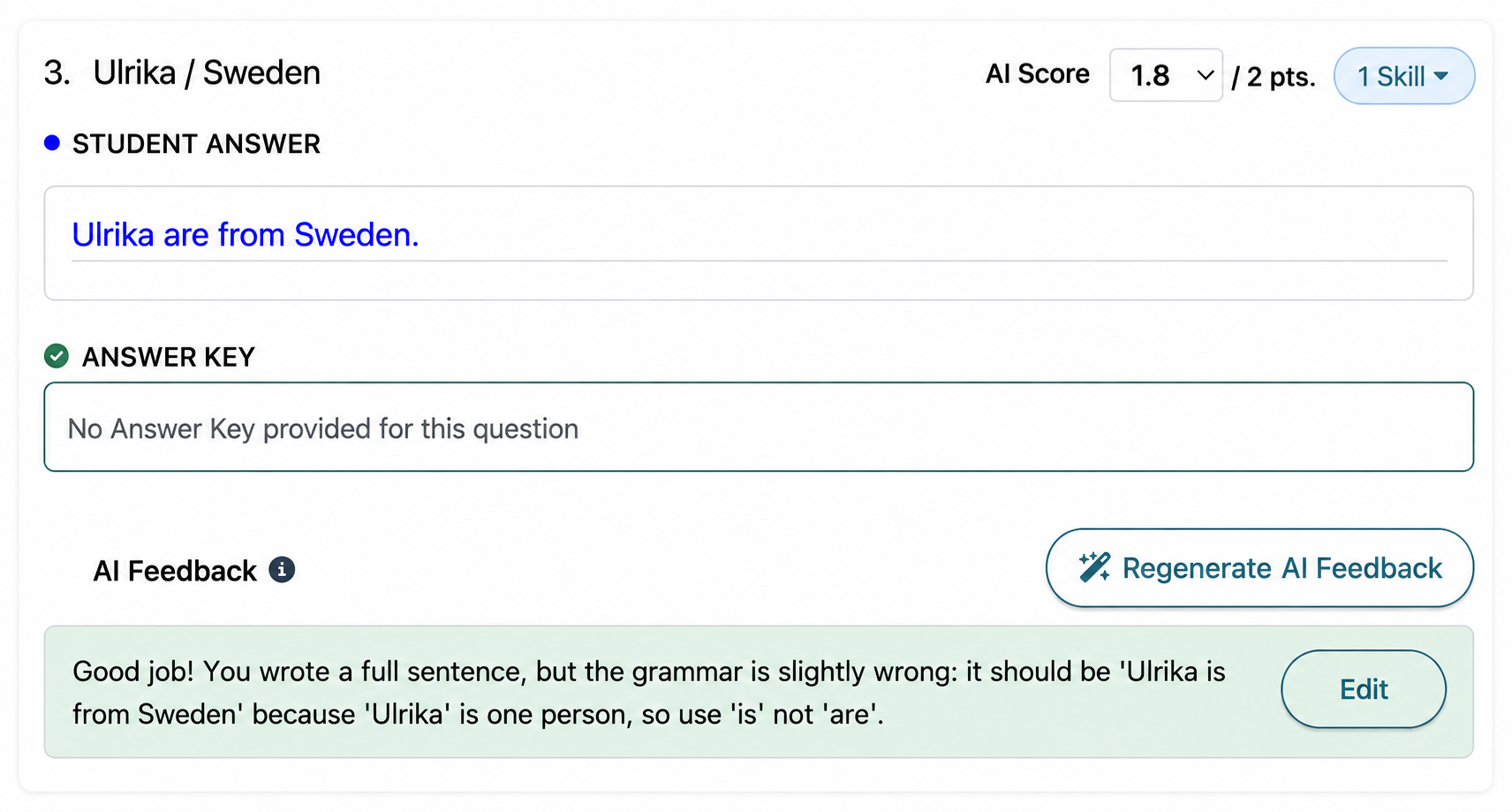
Free-text homework questions now receive automatic scores and AI-generated feedback. When a student submits homework, Off2Class evaluates their written responses and provides a suggested score and feedback for each question. Teachers review everything before students can see it which means that nothing goes to students automatically. Teachers can edit scores, rewrite feedback, or add their own notes at any time.
Since the initial launch, we've made a few refinements based on teacher feedback:
January 27, 2026: If a student's response receives a perfect score, the system no longer generates automatic feedback. A perfect answer doesn't need a correction note — teachers can still add feedback manually if they want to leave encouragement or additional context.
February 23, 2026: Teachers can now regenerate the AI feedback on any question. If the initial suggestion doesn't quite land — maybe it's too vague or misses the point — one click gives you a fresh take. You can always edit directly, too.
Why it matters
Grading free-text writing is one of the most time-consuming parts of teaching with homework. A teacher with 30 students who each submitted a 10-question homework set is looking at 300 individual written responses to read, score, and comment on. In practice, that means feedback gets delayed, or it gets thin, or it doesn't happen at all.
Auto-scoring changes the workflow from "grade everything from scratch" to "review and adjust." The AI handles the first pass — scoring responses and drafting feedback — and the teacher acts as the editor. For responses that are clearly correct, there's nothing to do. For responses that need nuance, the teacher refines the score or rewrites the feedback. The result is faster turnaround, more consistent feedback, and more time for the instructional work that actually requires a human.
This is a teacher tool, not a student-facing one. Students never see scores or feedback until the teacher releases them. The AI works for the teacher, not in place of them, so teachers retain full control over what their students receive.
How to use it
Auto-scoring is on by default for paid subscriptions. When a student submits homework with free-text questions, scores and feedback appear in the teacher's review queue. From there, teachers can edit scores, edit or regenerate feedback, and add their own notes before releasing results to students. Speaking homework is also automatically scored on paid subscriptions.
Note: Teachers who prefer to write all feedback manually can disable automatic feedback in Settings > AI Autoscoring Feedback Note. Scoring will continue as normal — only the automatic feedback generation is turned off. Teachers can still generate AI feedback on demand for any individual question.
Related article: How can I review my students' homework?
Beta history
These dates show when beta access began. Current availability is shown separately.
Disable AI Feedback Setting
Out of betaThe setting is generally available; AI scoring/feedback for written and spoken responses requires a paid subscription.
February 18, 2026 — Beta launch. A feedback preference let teachers stop automatic AI notes while retaining automatic scoring. The setting became generally available on February 25, 2026.
Note: Automatic feedback is provided by default for responses without a perfect score. If you prefer to write feedback yourself, use Settings > AI Autoscoring Feedback Note. You can still request AI feedback for an individual response, adjust scores or add your own comments. See the settings guide.
Regenerate AI Feedback
Out of betaAvailable with AI feedback on paid subscriptions.
February 17, 2026 — Beta launch. Teachers could generate a new AI feedback suggestion for a homework response, then edit the feedback or score themselves. General release followed on February 23, 2026.
Homework Writing Auto-Scoring
Out of betaAvailable to teachers on paid subscriptions.
April 1, 2025 — Beta launch. Free-text homework responses first received automatic scores and suggested feedback in the beta. Teachers could adjust both before releasing the results to students.
How to use it